What is Client-Side Storage?
As the name suggests, client-side storage allows the user to store data on the client (i.e. user's browser). Conversely, server-side storage will store data on the server (i.e. an external database).
When is it useful?
Client-side storage can be advantageous for the following use cases:
- Quick and network-independent access to data
- Store user preferences (i.e. custom widgets, font size, colour, etc.)
- Store session of previous activity (i.e. logged in an account, shopping cart, etc.)
- Save data locally for offline use
Types of Client-Side Storage
1. Cookies (Not Recommended)
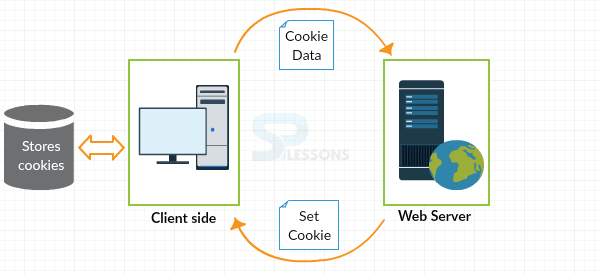
You probably have heard of cookies. They are the most classic type of client-side storage and have been used by sites since the early days of the web.
Cookies are sent from the server to the client and then stored on the client. The stored cookie can then be retrieved and sent back to the server whenever the client makes a request to the server again. Typically, cookies are used to manage account sessions, store user information and track user data.
However, because cookies are the oldest forms of client-side storage, they have a few security issues and storage limitations, which make them an unsuitable option to store client-side data.
CRUD Example:
//Create
document.cookie = "name=victoria";

//Read
console.log( document.cookie );

//Update
document.cookie = "name=victoria lo";

//Delete - Just set an expiry date that has passed
document.cookie = "name=victoria lo ; expires = Thu, 01 Jan 2010 00:00:00 GMT"
Comments
Post a Comment